
AI Translator
Free AI Translator Tool – Instantly translate text online with accurate, context-aware results for 40+ languages.
Input
Output
The AI Translator Tool is a web browser-based application. The main goal of the application is to deliver translations that are not only accurate but also contextually appropriate between different languages to the end-users. With just one click, the users can interchange the texts from one language to another and the entire process is so fast that no signing up and additional software installation are needed. So this tool can be recommended to anyone who needs a speedy and trustworthy text translation service like students, writers, professionals, or others.
The interface is simple yet very user-friendly and consists of two main sections: the input area where users can type in the text and the output area which shows the translation. The users can choose both the source and the target languages from a pool of more than forty languages. If the user is unsure about the source language, the translator can automatically identify it, so no manual selection is required.
Key Features
Multilingual Support
The AI translator offers a great variety of languages among which are English, Spanish, French, German, Russian, Arabic, Chinese (both Simplified and Traditional), Japanese, Italian, Portuguese, Turkish, etc., and even more. Switching between languages is not a problem at all for the users as they can translate the content in different linguistic contexts.
Auto-Detection
As a plus, the feature of auto-detect is provided with the tool. In case the user doesn’t know what the text’s language is, the system will do an analysis on the input and decide the source language automatically before going on with the translation. This takes care of accuracy even in the presence of mixed-language content.
Context-Aware Translation
The tool relies on top-notch AI models that are smart enough to sense the meaning of entire sentences, not just single words. The original text’s mood and purpose are kept, so the translations are just as natural and legible. This is very helpful for texts that have a need for perfect grammatical structure or professional formatting.
Copy and Share Functionality
User has the privilege to copy the translated version of the text to their clipboard with just one click after the translation is done. This allows for smooth presentation of the text in emails, documents, social media, or websites. The tool offers a seamless workflow from input to output without any extra steps.
Character Limit and Text Handling
The AI translator is allowed to deal with a maximum of 5000 characters in one request, thus paragraphs, short articles, or messages can all be handled equally. It easily gets along with special characters, punctuation, and line breaks so that the output will be exactly as the input text in terms of format.
Responsive Design
The tool comes with full support for both desktop and mobile platforms. The panels are responsive and adapt according to the various screen sizes while at the same time the usability is preserved over the different devices. The buttons, dropdowns,
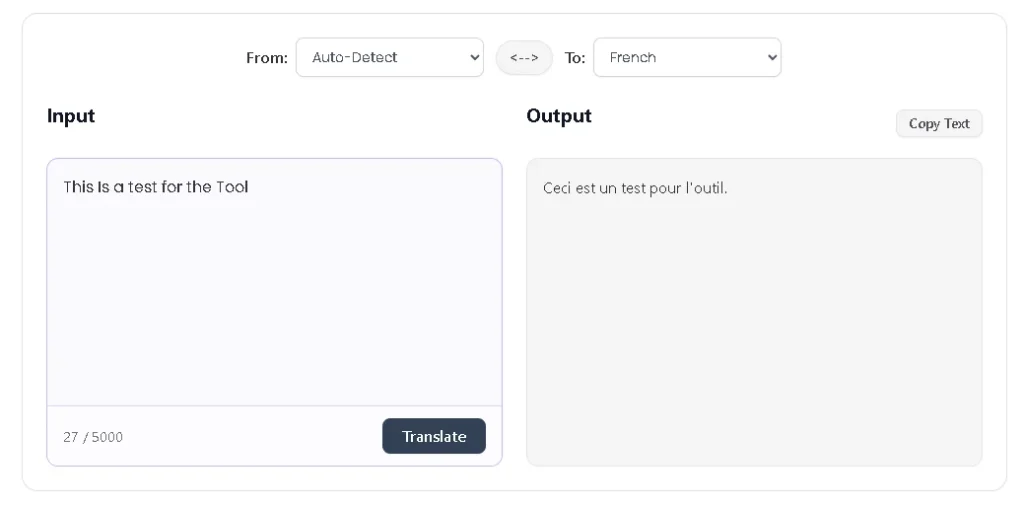
How to Use the Online Translator Tool
- Enter Text: The text that you wish to translate can be typed in or pasted into the input panel. The input field is capable of accommodating several paragraphs and also keeping the original line breaks intact.
- Select Source and Target Languages: Specify the language you want to translate from and the one you want to translate to. In case the source language is not known, you have the option to select Auto-Detect.
- Swap Languages: The tool has a swap function that reverses the source and target languages immediately. This comes in handy when translating two languages back and forth.
- Translate: Hit the “Translate” button. The tool will take care of the text and show the translation in the output panel.
- Copy Translated Text: After the translation is done, the Copy Text button can be utilized to transfer the output to your clipboard. Then, you are allowed to paste it into documents, emails, or any other software.